.svg)



FAQ - gGoG
gGoG and Gruffs Vault
Last updated: Feb 11, 2026
Do I have to use Gruffs Vault or lock gGoG?
No. Gruffs Vault is completely optional.
You can continue to use gGoG as a regular in-game currency without locking. Gruffs Vault is for players who want to earn passive rewards and unlock exclusive perks by committing gGoG over a season.
What happens when I lock gGoG?
When you lock gGoG:
- Your gGoG is locked for the active weeks of the season
- You qualify for passive rewards based on your tier
- You unlock perks that you can choose to purchase with gGoG
Locked gGoG can’t be spent during the active season, so staking is a commitment you should plan for.
How long is my gGoG locked for?
Each season lasts 5 weeks:
- Weeks 1–4: gGoG is locked and cannot be used
- Week 5 (Rest Week): you prepare and lock gGoG for the next season
Once a season ends, rewards are delivered and your gGoG becomes available again.
Can I add more gGoG after I’ve locked?
As of now we do not support mid-season top ups.
Once the rest week begins and you’ve locked your gGoG:
- You can’t top up your gGoG for that season
- Your tier is locked in for the upcoming season
This helps keep tiers fair and predictable.
What’s the difference between passive rewards and perks?
Passive Rewards
- Earned automatically for holding enough gGoG
- Does not cost gGoG
- Delivered at the end of the season
- Higher tiers receive all lower-tier passives. For example you lock enough gGoG to access Tier 5; you will receive passive rewards from Tier 5 through to Tier 10.
Perks
- Optional items you unlock by reaching a tier
- Costs gGoG to purchase
- Available immediately once the season starts
- Can only be bought with gGoG
What rewards will be available for Season 1?
There are 10 Tiers of passive rewards for Season 1, some which are have highly limited quantities and some unlimited. Make sure you log into the game to check out which rewards are available for Season 1!
What happens if I don’t lock?
Nothing.
You simply:
- Don’t earn Gruffs passive rewards
- Don’t unlock Gruffs perks
- Can continue using gGoG freely in-game
You can choose to lock in a future season if you change your mind.
Does gGoG count towards Gruff's web epoch rewards??
Yes — but only once you've completed the Pledge step on Gruff's Vault web. Rewards are calculated based on your pledged amount only.
To have your holdings counted:
- Visit Gruff's Vault at https://www.gog.community/portal/gruff-vault
- Press PLEDGE
- Enter your total pledge amount — this should be the combined total of both your $GOG and gGoG that you want counted toward rewards
Once your pledge is confirmed, rewards are calculated based on the total pledged amount ($GOG + gGoG) and the length of time you've pledged across that cycle (time-weighted average). This is then measured proportionally against the total pool to determine your specific reward distribution.
What happens if my wallet balance drops below my pledged amount?
Your pledge will be cancelled and no rewards will be paid out to you at the end of that cycle.
This applies if your balance drops below your pledged amount at any point during the active season. To avoid this, make sure you're not spending or moving $GOG or gGoG that forms part of your pledged amount while the season is running.
Do I still need to hold a minimum of 100 $GOG in my wallet?
As long as you hold an equiavlent amount of $GOG in gGoG you will meet this specific web staking criteria
Do I still need to meet one of the 3 other requirements for Gruff's web epochs?
Yes, players will still need to meet at least 1 of the 3 requirements listed below
- Make a purchase in Eri's Store
- Buy a GOG NFT on the Marketplace
- Make a Sacrifice on the Altar
Please visit Gruff's Vault here for more information
Why add a rest week to web Gruffs?
The rest week creates alignment between web and in-game Gruffs, giving players a consistent seasonal rhythm and clearer planning across both experiences.
Is this the final version of Gruffs?
No — this is the first rollout.
We’ll be actively gathering player feedback and using it to improve rewards, tiers, and future features. Getting involved early helps shape what Gruffs and gGoG become over time.
-- --
The Basics of gGoG
last updated: 11 Feb, 2026.
- What is gGoG in simple terms?
- An in-game currency that opens up exclusive offers, promotions, features, and experiences in Guild of Guardians
- How do I get gGoG?
- Go to Eri’s Store on [URL]. Make sure you have $GOG in your wallet.
- What can I spend my gGoG on?
- During initial release you can access and purchase in-app items with up to 15% off.
- You can also set your rental and listing fees in gGoG. More information on rentals here https://www.guildofguardians.com/news/introducing-ggog-everything-you-need-to-know
- I can’t see gGoG prices in the in-game shop?
- You’ll need to activate gGoG before dual pricing ($:gGoG) is displayed for all in-app purchasable items.
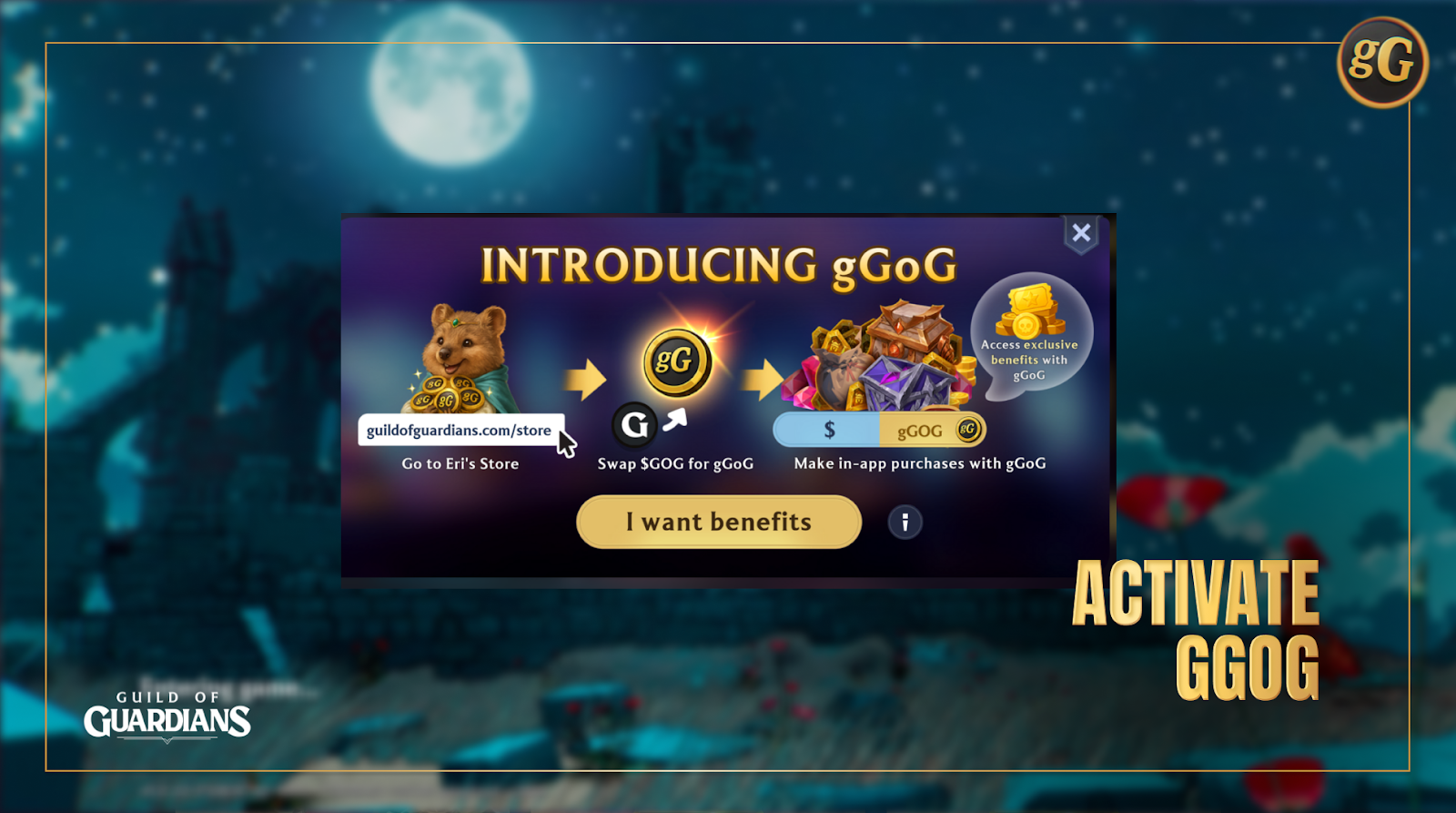
- There’s a pop up banner where you can click ‘I want discounts’, or you can go into the in-app store and on the top banner click ‘I want discounts’
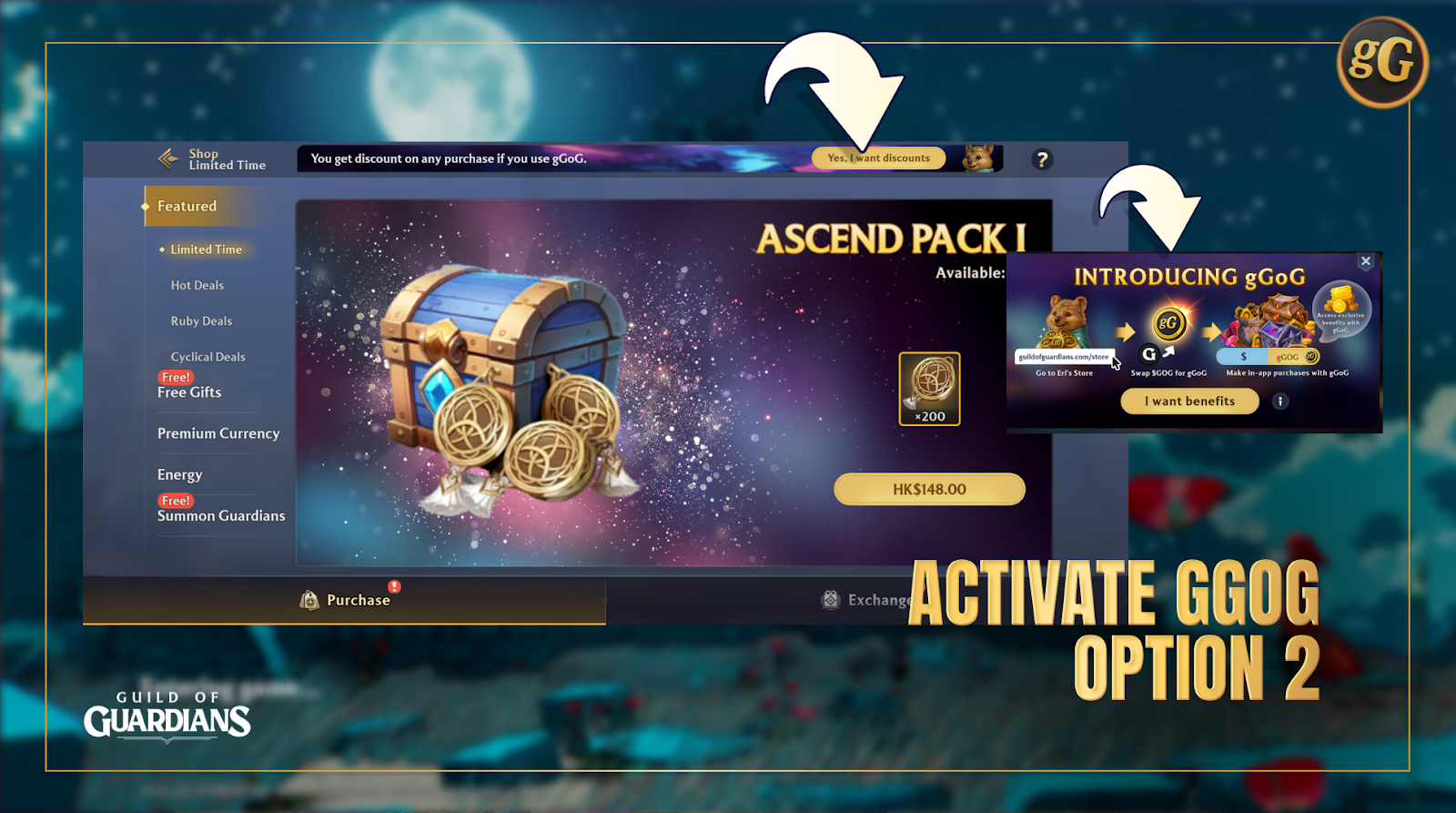
- If the pop up isn’t displaying go into your settings, and click into the ‘notifications’ icon on the right. Scroll to the bottom and enable gGoG.
Converting $GOG to gGoG
- I have $GoG. How do I convert it to gGoG?
- Go to Eri’s Store and navigate the gGoG tab
- Connect your wallet, make sure you have $GOG
- Follow the on-screen instructions (you can refer to our blog here) and approve your purchase in game
- What is the conversion rate between $GoG and gGoG?
- For every GOG you receive 10 gGOG
- Is converting $GoG to gGoG reversible?
- Yes, you can swap/convert your gGoG back into $GOG.
- For those unfamiliar with the term ‘Swap’, you can think of it as ‘convert’
- What fees are involved?
- Swapping $GOG to gGoG will incur a 2% platform fee.
- For example:
- Player converts 1000 $GOG, which is equivalent to 10,000 gGoG
- Platform fee of 2% applies
- Player receives 9800 gGoG after transaction is confirmed.
- How about converting gGoG to $GOG?
- You can withdraw your gGOG back to $GOG anytime through the Eri Store. When you do, a fee applies that is calculated based on your withdrawal amount —small amounts face a higher percentage fee to discourage constant micro‑trading, while large withdrawals pay a lower percentage but more in absolute terms. You’ll always see your exact $GOG payout and fee upfront before confirming.
- This design powers a healthy in‑game economy where your leaderboard rewards, Gruff’s Vault earnings, and tournament payouts stay valuable.
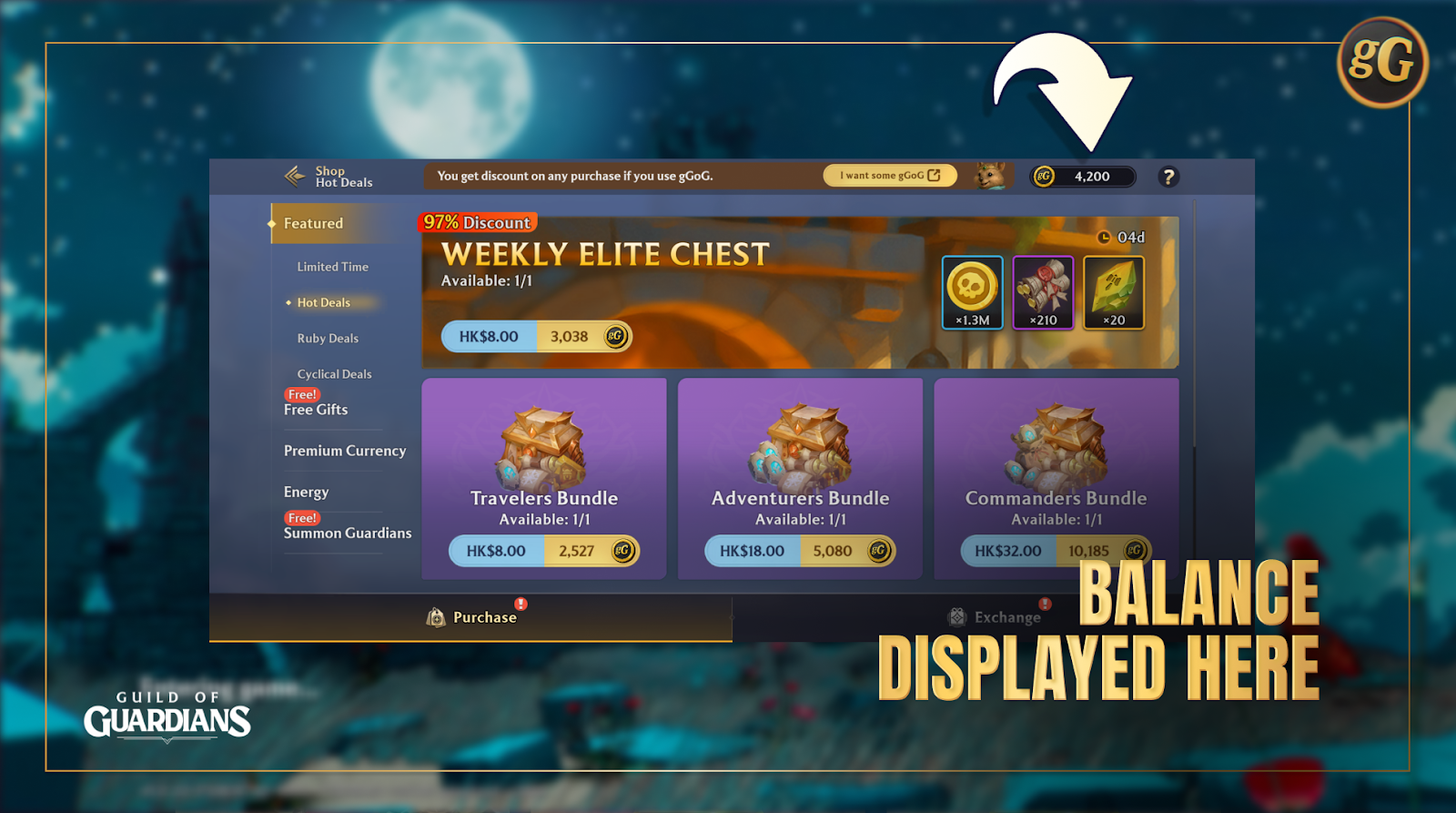
- Where can I see my gGoG balance?
- Once you have completed your swaps, you’ll be able to see your gGoG balance in-game. See below
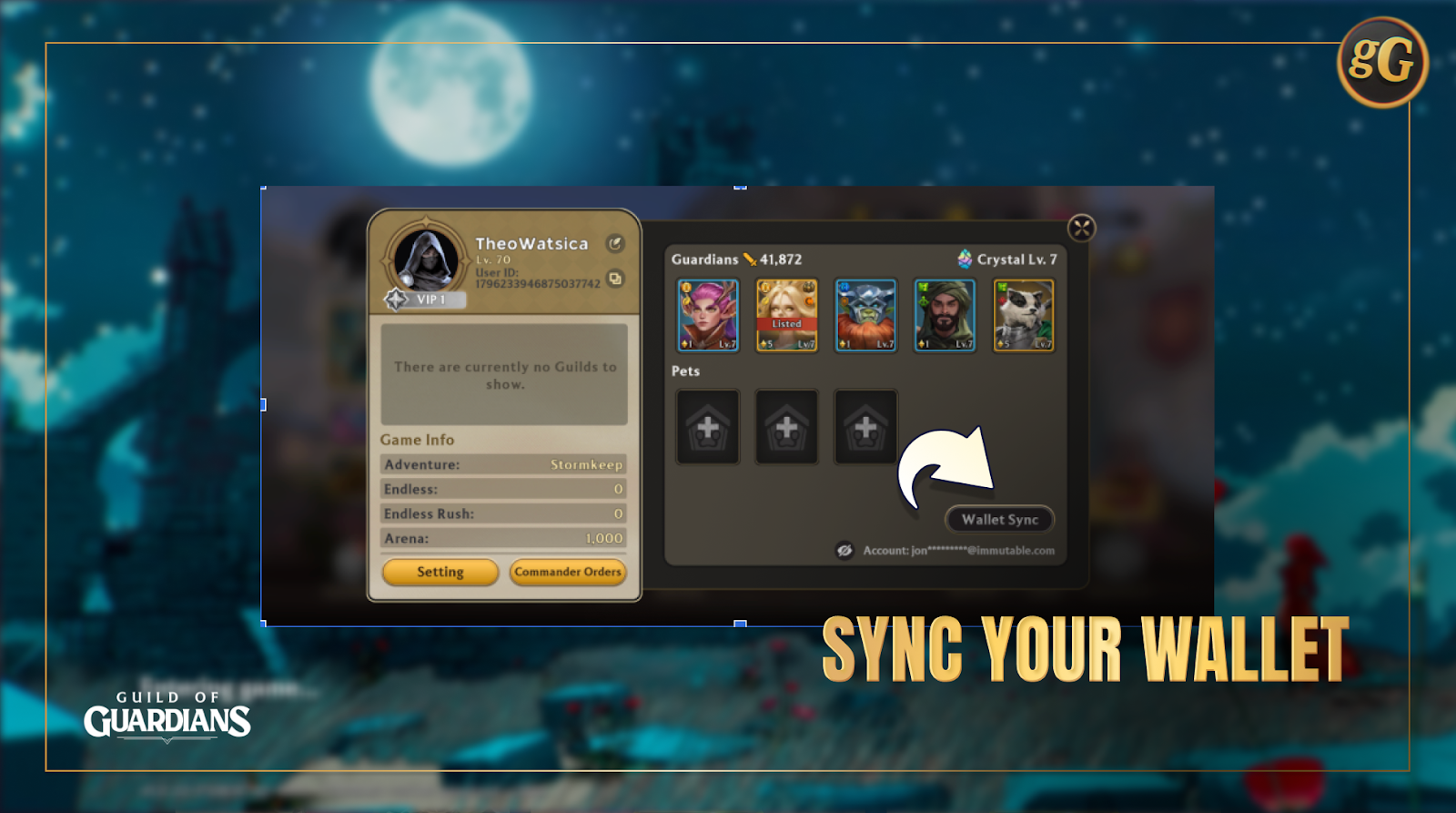
- Why is my gGoG balance not updated?
- Make sure that your wallet in-game is synced! This should be automatic, however if need, click on your profile avatar and click on Wallet Sync
Vision for gGoG
- Is gGoG a web3 on-chain token?
- No, gGoG is not an on-chain token. It’s value is however pegged to $GOG.
- How does this model benefit $GoG holders?
- All players will find use for gGoG. During the initial phase of rollout, the primary use case is accessing exclusive discounts with in-game purchases (up to 15% off), and for players who rent or list Guardians they will also use gGoG for all fees
- Is gGoG pegged to any token?
- Yes, to $GOG
- Why are there withdrawal fees?
- Withdrawal fees help sustain deflationary sinks: Every withdrawal is balanced by in‑game spends (like rental fees that lock or burn gGOG, keeping supply tight so your rewards hold value and prices don’t inflate.
- Withdrawal fees also protects the flywheel: Prevent sudden sell‑offs from crashing $GOG liquidity, ensuring smooth reward emissions → conversion → spending loops that make competitive play rewarding for everyone.
- There’s mention of initial rollout, can I expect more from gGoG?
- Stay tuned and turn on your notifications across the platforms where you interact with Guild of Guardians! We’ll always keep you updated with the latest information on our releases!