.svg)



.webp)
How to participate in Tournaments
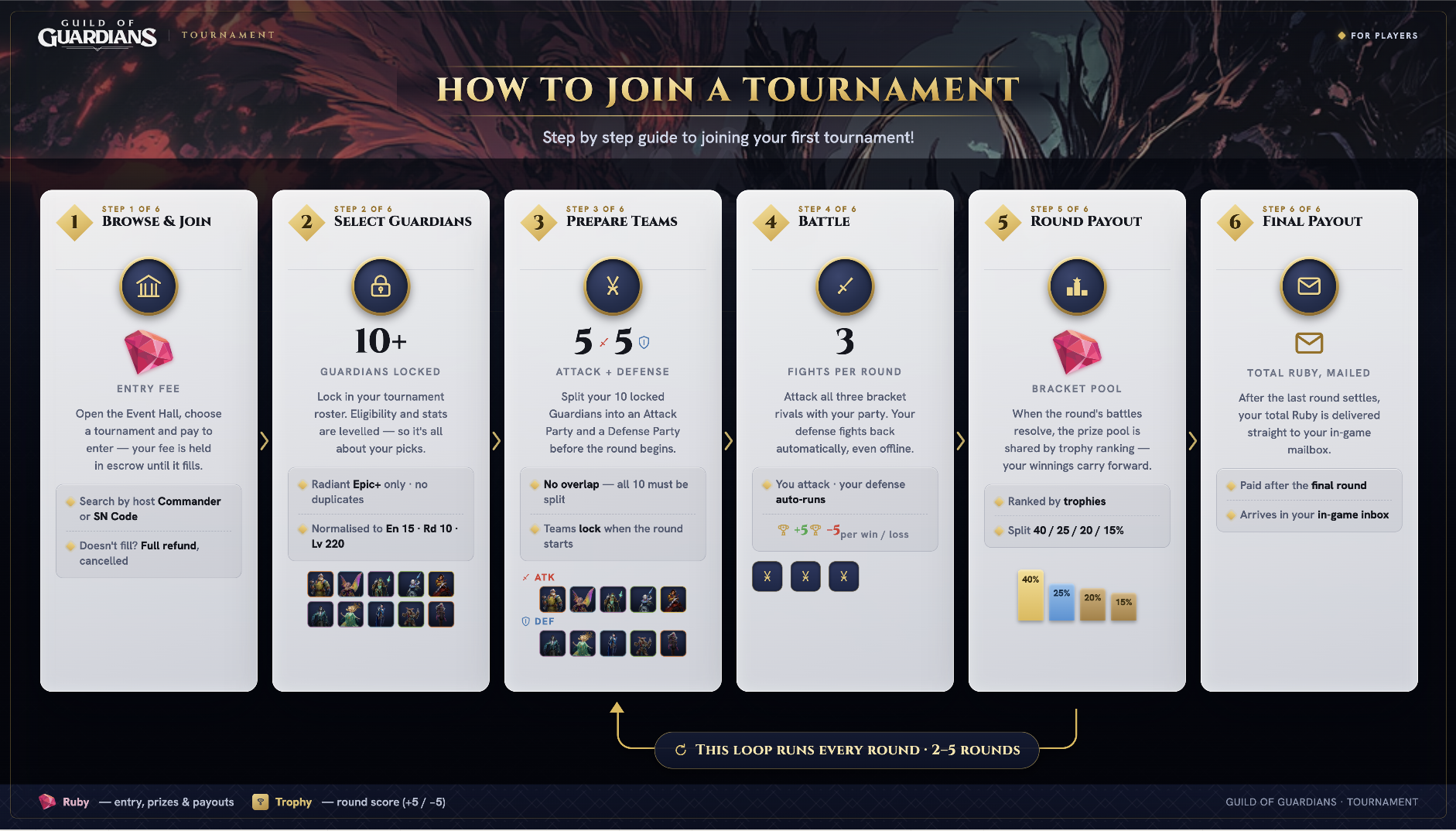
Tournament Guide · Participant
How Tournament Works
Tournament is a new mode where you compete against real players for Rubies. You pay an entry fee to join, your Rubies pools with the other players in your bracket, and at the end of each round it splits based on where you finished. Come out on top and you walk away with more than you put in.
Here is how it works from start to finish.
Finding a Tournament
Open Tournament and head to the Event Hall. Each tournament card shows you what you need to know before committing — entry fee, how many rounds it runs, the scoring per win and loss, and how many spots are left.
Check the participant count. A tournament at 7/8 is about to kick off. One at 1/8 might sit open for a while. If a tournament is already marked as started you cannot enter — find another one.
You can also search for a specific tournament using the host's name or their SN Code if someone shared it with you.
Tap Join and pay the entry fee in Rubies. Those Rubies are held until the tournament officially starts. If it never fills up, you get it back in full. You can join more than one tournament at a time.
Picking Your Guardians
Once you have joined you have 24 hours to pick the 10 guardians you are bringing in. Five will go to your attack team, five to your defense team.
Only Radiant guardians of Epic rarity or above are eligible and you cannot pick duplicates. All guardians compete at En 15, Rd 10, Level 220 — your gear, exclusive equipment, and guild artifacts do not apply. Everyone is on the same footing, so what matters is who you pick and how you use them.
Pick carefully. Once the tournament starts your 10 guardians are locked in for the whole thing.
Setting Your Teams
Before each round starts you have around 22 hours to split your 10 guardians into an attack team and a defense team. Your attack team is the squad you use to challenge opponents. Your defense team sits and waits — it fights automatically when opponents come at you, whether you are online or not.
Attack and defense cannot share guardians, so every one of your 10 has a job before the round begins.
Once the round starts your defense team is locked. You can still adjust your attack team's positioning but not the guardians themselves.
How Each Round Works
Each round you are placed into a group of four players with a similar Ruby balance. You fight all three of them — your attack team against each of their defense teams. Win and you earn trophies. Lose and you drop them.
The scoring in your tournament was set by the organiser when they created it. In most cases a win earns +5 trophies and a loss costs −5, for both attack and defense results.
Your defense battles resolve automatically. You do not need to be online for them. But you do need to show up and initiate your three attack fights yourself.
If you do not attack an opponent, you are marked as a loss for that fight at settlement. If an opponent does not attack you, you are marked as a defensive win. Unplayed fights are not left as neutral — they resolve in favour of whoever showed up.
How Rubies are distributed
After each round ends there is a short settlement window. Your bracket pool — the combined Ruby of all four players in your group — splits by final trophy ranking.
Using a standard tournament as an example:
| Rank | Share | Ruby from an 18,000 pool |
|---|---|---|
| 1st | 40% | 7,200 |
| 2nd | 25% | 4,500 |
| 3rd | 20% | 3,600 |
| 4th | 15% | 2,700 |
Exact amounts depend on the entry fee and cut % set by the organiser. These figures use 5,000 Ruby entry fee and 10% cut as an example.
Your updated Ruby total then determines who you are grouped with in the next round. Higher Ruby players face each other. Lower Ruby players face each other. The brackets reset every round and you cannot be matched against someone you have already faced.
After the Final Round
When all rounds are done your final Ruby total is sent to your in-game mail. That is your payout.