.svg)



.webp)
How to organise Tournaments
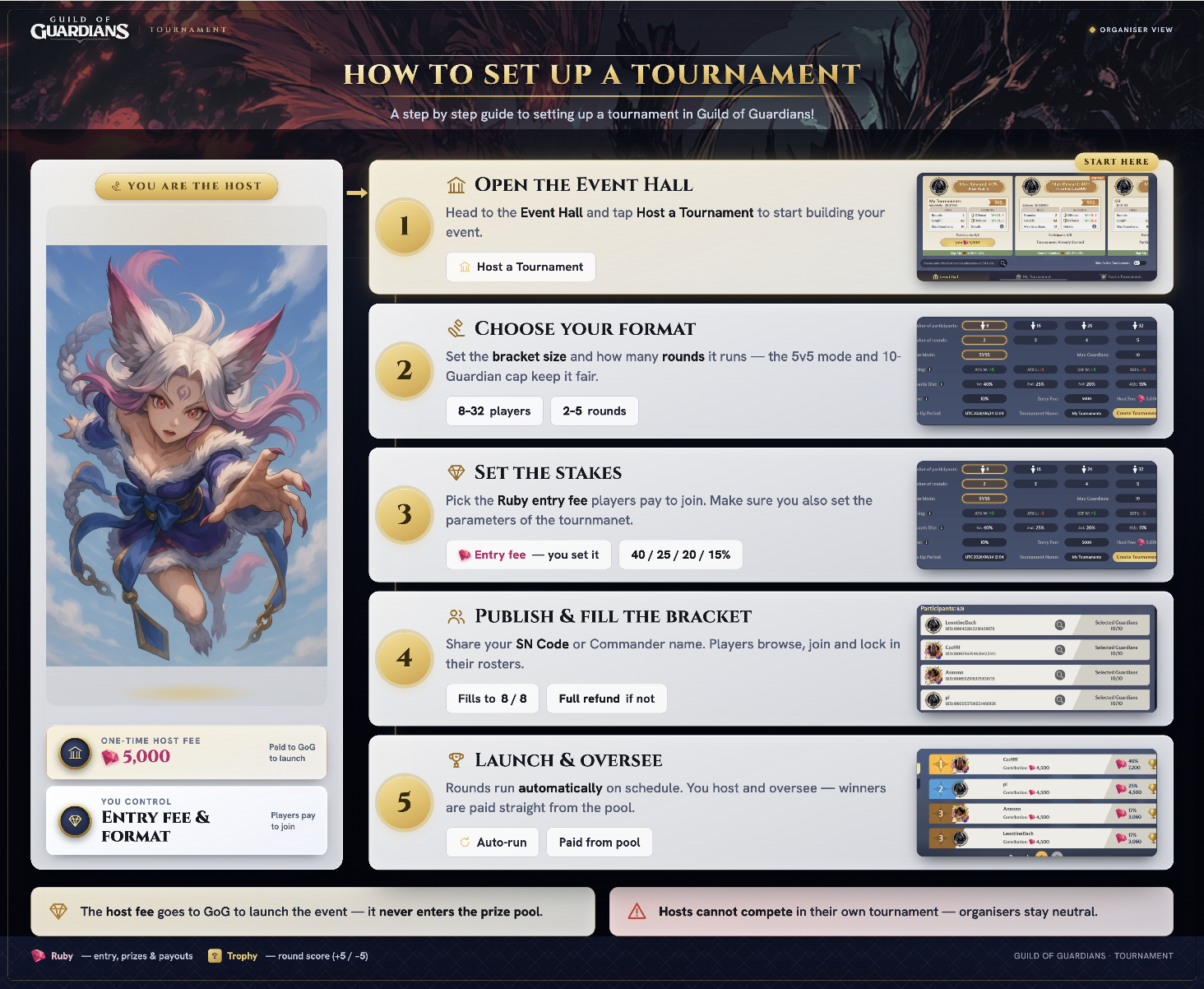
Tournament Guide · Organiser
How to Host a Tournament
Hosting a Tournament means you set it up, configure it, and earn a cut of every entry fee when it runs. You do not compete in it — your role is to create the event and let other players fight for the prize pool you have built.
Here is everything you need to know before you create one.
What It Costs to Host
There are two separate fees involved in hosting and it is worth being clear on both before you start.
The Host Fee is what you pay to create the tournament. It goes to GoG and does not enter the prize pool. Think of it as the cost of running the event.
The Entry Fee is what participants pay to join. You set this amount when you create the tournament. A percentage of every entry fee — the cut you configure — is shared between you and GoG when the tournament launches. The rest goes into the prize pool that participants compete for.
The two fees are separate. The Host Fee is your upfront cost. The Entry Fee cut is how you earn.
Setting Up Your Tournament
Go to Tournament and open the Host a Tournament tab. You will configure the following:
| Setting | Options | What it affects |
|---|---|---|
| Participants | 8 / 16 / 24 / 32 | How many players can join and the maximum size of the prize pool |
| Rounds | 2 / 3 / 4 / 5 | How many Prepare → Battle → Settle cycles the tournament runs |
| Game Mode | 5V5 | The battle format — 5 guardians per side |
| Max Guardians | 10 | How many guardians each participant registers (5 attack + 5 defense) |
| Scoring | Set per win and loss | How many trophies a win earns and a loss costs — for both attack and defense separately |
| Reward Distribution | Must total 100% | How the bracket pool splits across 1st, 2nd, 3rd, and 4th place. Each percentage must sit between 15% and 40%. |
| Entry Fee | Set by you | The Ruby amount each participant pays to join |
| % Fee | 5% to 30% | The cut taken from every entry fee, split between you and GoG |
| Sign-Up Period | Date and time | When registration closes — tournament launches or cancels at this point |
| Tournament Name | Text input | What participants see when browsing the Event Hall |
All settings are locked once you tap Create Tournament. You cannot change configuration after the tournament goes live.
When you are done, tap Create Tournament and pay the Host Fee. Your tournament goes live in the Event Hall immediately.
What Happens When It Launches
Once your sign-up period ends and the participant slots are filled, the tournament moves into the combat phase automatically. At that point the entry fees are processed — your cut is paid out and the remainder goes into the prize pool for participants to compete for.
You cannot change any configuration once the tournament is live. What you set at creation is what runs.
How You Earn
Your earnings come from your share of the % Fee cut across all entry fees collected.
As an example: a 16-player tournament with a 5,000 Ruby entry fee and a 10% cut brings in 80,000 Ruby in entry fees. 10% of that is 8,000 Ruby, split between you and GoG. The other 72,000 Ruby goes into the prize pool.
A higher entry fee, more participants, and a higher cut percentage all increase your earnings. Finding the right balance is part of running a good tournament — too high an entry fee and players will skip it.
If Your Tournament Does Not Fill
If the sign-up period ends without enough participants to launch, the tournament is cancelled. All entry fees paid by participants are refunded in full. Your Host Fee is non-refundable.
A Few Rules Worth Knowing
- You cannot participate in a tournament you have created. Your role is organiser only.
- You can only run one tournament at a time.
- There is a seasonal cap on how many tournaments can be created across the game. Once that limit is reached no new tournaments can be created until the next season.